








How to make voice to text write in your own style
In AudioPen, a writing style is a few lines of plain instructions. Here's how to pick one, write your own, paste in your own writing, and choose how much it rewrites.
By Louis Pereira, founder of AudioPen
The short answer: to get voice to text in your own style, tell the app how you write. In AudioPen, open Writing Styles and pick a built-in style, or write your own in plain words. Paste in a few paragraphs of your writing so it sounds like you, and set Rewrite intensity to Medium or High.
You said it well out loud. Then the rewrite came back tidy, polite and nothing like you. I've said it before: AI generated writing sucks, and it's almost immediately recognizable. The fix is to tell the rewrite who you are, and how far it's allowed to go.
Set up a writing style in six steps
- 1Open AudioPen's settings (the gear at the top right in the web app) and go to Writing Styles.
- 2Tap Change style to open your style library. Pick a style under My Styles, or add one from Discover Styles.
- 3To make your own, tap Create a new style, give it a name, and write the instructions in plain words.
- 4To make a style write like you, add Write like me from Discover Styles, then edit it and replace the placeholder with a few paragraphs of your own writing.
- 5Set Rewrite intensity to Medium or High. Then slide Output length toward short or detailed.
- 6Record a note, or double-tap the hotkey on Mac or Windows to voice type, and AudioPen writes it in that style.
Is a writing style the same as a tone setting?
No. Some writing tools give you a few fixed tones. Gboard's writing tools, on the phones and languages that support them, offer Professional and Friendly.
A writing style in AudioPen is a short set of instructions that the rewrite follows every time. A tone picks from a menu. A style is a brief you wrote.
Which built-in style should you start with?
Start with the job, not the mood. AudioPen's style library is grouped by what you're writing, and these are the ones to try first:
- Thinking out loud, everyday notes: Clear & Simple.
- Notes you'll skim later: List or Book Notes.
- Email: Casual Email or Formal Email (more in how to draft emails by talking).
- Posts: LinkedIn Post or X (Twitter) Thread (more in speech to text for content creators).
- Talking to ChatGPT, Claude or a coding agent: LLM Prompt.
- A diary: Journaling.
Here's what people actually pick. Across 20,000 AudioPen notes from July 1 to September 28, 2026, Clear & Simple was on 29.6% of them, about 3 in 10. All the built-in styles together covered 68.5%. A style the person wrote themselves was on 15.2%, and 16.3% had no style picked.
Share of notes by writing style, 20,000 notes, July 1 to September 28, 2026
The way I read it: the most-used style is the plainest one in the library. People want their own words made clear, not dressed up as someone else.
How do you write a style that sounds like you?
Write it like a note to a good editor. AudioPen's own styles show the shape. Here's Clear & Simple, word for word:
Friendly, flowing, simple sentences. Use simple words. Prioritize clarity above all else.
And here's X (Twitter) Thread:
Extract a few useful ideas from this transcript and format each idea as an individual paragraph of 280 characters or fewer. End with a summary or an actionable takeaway.
That's all a style is. To write your own, cover five things:
- What it's for and who reads it: a reply to your team, a note to a client, a post.
- The shape: how many sentences, paragraphs or bullets, and how long.
- Your habits: contractions or not, the words you use, the ones you'd never say.
- What to keep: names, numbers, and the phrases that are yours.
- What to leave out: greetings, sign-offs, a summary at the end.
Here's a style for quick Slack replies, as it looks in the Create a writing style form:
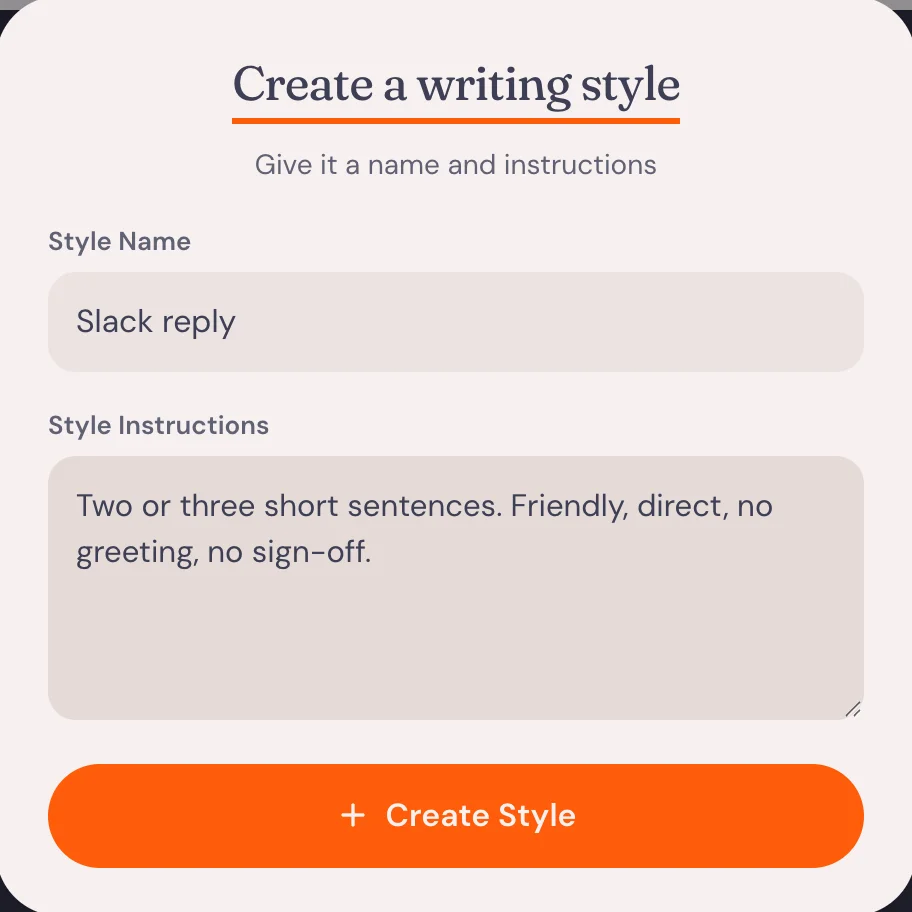
To sound like you, start from Write like me. Its whole instruction is "Write in a style similar to the following text", followed by your own paragraphs. Match the sample to the job. Your best emails make a good email style. Your newsletter makes a good newsletter style.
You can mix a sample and instructions in one style: paste your paragraphs, then add a line of instructions under them, like "Contractions, no greeting, no sign-off."
Keep one style per kind of writing. I have an email style that sounds like me on a good writing day, a casual one for Slack and WhatsApp, one for prompts to ChatGPT and Claude, and one for coding tools like Cursor and Claude Code.
How much should AudioPen rewrite?
Rewrite intensity has three levels, and the app describes them like this:
- Low: "A light clean-up of your words. Style and length don't apply."
- Medium: "Your structure and wording, in your chosen style."
- High: "Fully rewritten in your style and length."
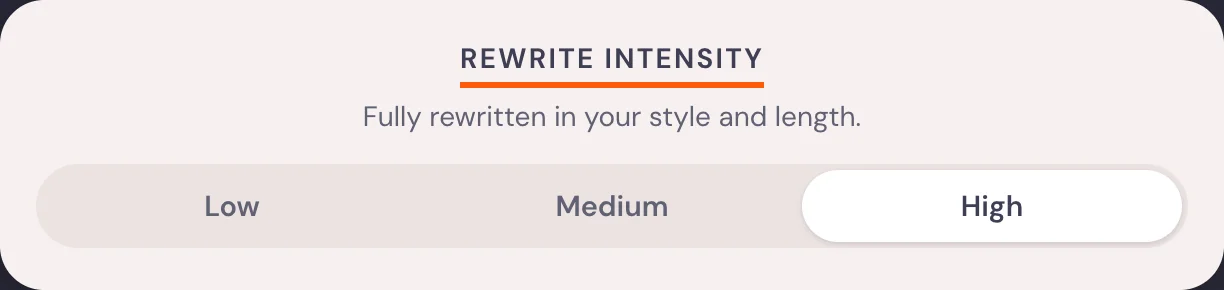
If a style seems to do nothing, you're probably on Low. For anything that should still sound like you, use Medium: it keeps your structure and wording and writes them in your chosen style. Use High for a messy brain dump you want turned into a draft. Use Low when you want your own words back, cleaned.
Output length sits next to it, as a slider from "short and crisp" to "more detailed". The middle is "Some compression, but not too much."
Does your style work when you voice type in other apps?
Yes. On Mac and Windows, hold the hotkey, talk and let go to get clean text at your cursor. Double-tap instead, talk, then tap again, and AudioPen rewrites what you said in your chosen style before it types it in Gmail, Slack, Notion or wherever your cursor is. That rewrite runs in the cloud, and nothing is saved. On iPhone, the AudioPen keyboard uses the same styles. The setup is in how to voice type on a Mac.