AudioPen for memoir writers

Write the book about your life by telling it.

You already know the stories. You have told them for years. Tell them once more, out loud, and AudioPen hands back a written page in your own writing style.

Download AudioPen

Free to start. Loved by over 200,000 people.

Why memoirs stall

Telling a story is easy. Typing it is not.

Many memoirs stop after a few pages, and rarely for lack of stories. A memory you could tell in five minutes turns into an evening at the keyboard, fixing typos and rewriting the first line. The keyboard slows you down until you give up.

So talk instead. Tell one memory the way you would tell it to a grandchild. AudioPen writes it down and clears out your filler words, false starts, and broken phrases. You get a page you can read back and fix. A chapter takes a few evenings of talking, not months of typing.

Chapter One

The method

How to write a memoir, one story at a time.

1. Talk in stories, not in chapters

You do not need an outline. Record one note per story: the first job, the house you grew up in, the day you met. Tell it the way you would at the kitchen table, with the names, the street, and the smell of the kitchen. Details come back more easily when you talk.

2. Get it back in your own style

Create your own writing style in AudioPen. Paste in something you wrote years ago, like an old letter or a diary entry, and every story comes back sounding like you. Or create a style that writes like your favorite author.

3. Shape the stories into chapters

Some stories make a chapter on their own. For others, combine a few related notes into one draft with SuperSummaries, which come with Prime. Then make your own edits: fix a date, add a name, or cut a line that is not quite right. It is your book.

Your own writing style

Your voice, or your favorite author's.

You do not need to be a good writer to write a memoir. You do not even need to be a good speaker. Talk the way you talk, and let your writing style do the rest.

Create your own style in AudioPen. Paste in something you wrote before, like an old letter, a diary entry, or a speech you once gave. AudioPen learns how you put words together, and every story you tell comes back in that style.

Love the way someone else writes? Create a style from your favorite author instead. Paste in a page of their writing, or describe it in a sentence, and AudioPen tells your stories that way. The stories and the details stay yours. The original transcript is kept next to every note, so you never lose what you actually said.

Voice typing, in any style

Talk straight into your manuscript.

Already have a draft in Word or Google Docs? Put your cursor where the next page goes and talk. The words land right there, so the book grows in one file.

Talk the way you think. Start mid-thought, circle back, change your mind halfway through. AudioPen types your exact words when you want them, or writes it up in a style you pick, right at your cursor.

What you say
“so my father, he, uh, he bought the shop in, it was 1962, no, '63, the spring of '63, and the first thing he did was he painted the sign himself, green and gold, and he got the spelling wrong, he spelled it with two Ls, and he never fixed it, he said people remembered it better that way”
Typed into Google Docs, in your own style

Works in any app, on every device: a hotkey on Mac and Windows, the AudioPen keyboard on iPhone and iPad, and a floating bubble on Android.

Tags and folders

A folder for every chapter of your life.

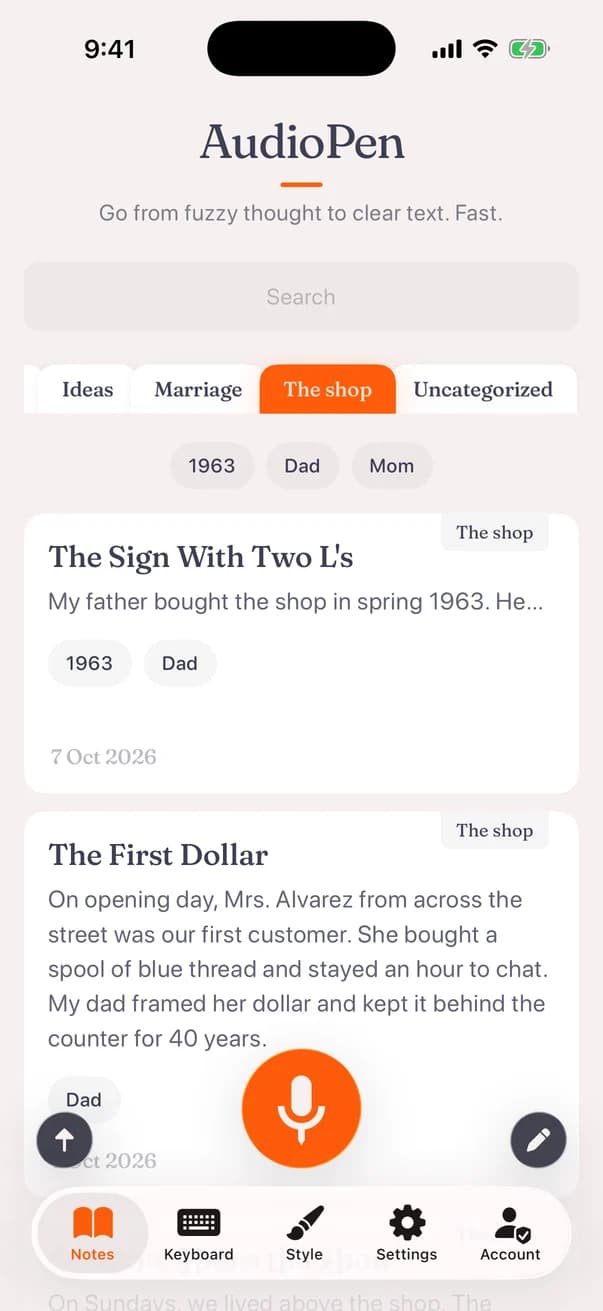
Every story you record is saved and searchable. Make a folder for each chapter or each decade, and tag stories with the people and places in them, like Dad, the harbor, or 1963. When you sit down to write a chapter, its stories are all in one place.

Turn on automatic tagging in the iPhone or Android app, and AudioPen adds your existing tags to each new story for you. On Prime, combine the stories in a folder into one draft with SuperSummaries, or add to a note when you remember something new.

Have old voice memos of a parent telling stories? On Prime, upload the audio file and AudioPen writes it up the same way. You can also tell your stories in the language you grew up with and get them back in the language your grandchildren read.


Who it is for

For anyone with a life worth writing down.

Writing your own memoir

You have the stories and you want them in a book, for your family or for anyone who will read it. You do not need to think of yourself as a writer. If typing is hard on your hands, see AudioPen for RSI and dyslexia.

Helping a parent tell theirs

Sit with them, ask one question per recording, and let them talk. Or set AudioPen up on their phone so they can record whenever a memory comes back. To try it first, use the free online voice recorder in your browser.

Writing a family history

Tell the stories behind the old photos and the names on the family tree, so the next generation gets more than dates. Writing a novel instead? See how writers use AudioPen.

Writing styles

Your story, in the style you choose.

Create a style from your own writing, or from an author you love, and every story comes back in it. You can also choose how much AudioPen changes. Try it on the story below.

Rewrite level

Retains structure where possible, rewritten in your chosen style

Output length

Some compression, but not too much.

Writing style

The summer I turned fifteen, my uncle got me a job at the cannery by the harbor. I had to be there at five in the morning, and I remember walking down in the dark with my lunch in a paper bag. The smell of fish got into everything, my hair and my clothes. My mother made me leave my shoes on the porch. They paid us forty cents an hour, which felt like a fortune. A woman on the line named Rosa taught me how to work fast without cutting myself. I think about her more than almost anyone from that time.

Try it with your own voice

Free to start, on every device.

Where it lives

Tell your stories wherever you are.

Record on your iPhone or Android phone from your favorite chair, on a walk, or at the kitchen table, then read and edit the chapters on any computer. On Mac and Windows you can talk straight into Word or Google Docs.

One Prime account covers all of them. Your notes sync across every device, so whatever you capture on one is waiting on the next.

Testimonials

Loved by people who think out loud

Read what real users have to say about AudioPen.

I used to manually summarize my transcribed brainstorming sessions. Took hours. AudioPen automates everything to the point where I am almost done with my article after talking about a topic for 10min. Magic.
Arvid Kahl · @arvidkahl
No product has fundamentally changed the way I work over the last 12 months more than Audiopen. Home Screen on iPhone.
Sidin · @sidin
I can now create 95% of my blog posts and have minimal editing. In my tone of voice. This saves so much time
Vincent · @vincenthaywood
I’ve been using AudioPen to talk through my ideas, have them summarized and then use the summarization as a draft for blog posts. 13 out of 10. Highly recommend for the “blank page” problem.
chase adams · @curiouslychase
This is probably the best product I’ve come across in the past 18 months. So useful and it just keeps getting better.
Dave O’Callaghan · @OCallaghanDavid
Simple, but effective. The best tool to convert rambling into structured text, while keeping what you rambled intact.
Murali Balaraman · Founder, Studio CX360
I freakin love AudioPen.ai. If you are not using it yet, get on it.
Mr. Fettfinger
Most helpful AI tool = audiopen. Been using it daily to do things like: turn voicenotes into action items, content ideas (magic for this), summarize calls, giving feedback. The UI is also so clean that it’s an absolute joy to use.
Cathryn Lavery · @cathrynlavery
You speak to it as thoughts come in. It stitches a fine narrative from the rant. Writers can edit a ‘wrong’ page, not a ‘blank’ page. AudioPen gets you to 90% and then you do the rest.
Joseph Jude · @jjude
OH MY GOSH. I just learned about AudioPen today, and it’s already a GAME CHANGER. If you write, create, or do any serious thinking, this tool is for you.
Bear Smith · @RealBearSmith
This is one tool that has dramatically changed the way I think. It has allowed me to get the thoughts out of my head and down on paper.
Melvyn Tan · @melvyndotme
I can’t say enough good things about the AudioPen app. It’s been my go-to app for getting ideas down without having to type. Not only does it arrange even the most inarticulate nonsense into readable sentences, it’s the best dictation app I’ve ever used.
Otis Frampton · @otisframpton
I’ve been writing online for over 10 years and tried virtually every writing app, productivity, note-taking, and idea-capture system out there. Nothing comes close to the amount of time AudioPen saves me.
Trying Not to Suck at Life · @trynotsuck
This is by far the greatest and most useful tool I have ever had! I have severe ADHD and it’s able to translate my rambling into a well written and concise note. I feel more organized and less anxious!
Kristen Doutsas · Aesthetician, entrepreneur
Best buy in 2023: AudioPen from @louispereira. Hats off.
Galih Kusumah · @galih_kusumah
Switched from Superwhisper to Audiopen Mac App within 20 minutes of using the Mac App.
Namit Oberoy
Tried it out, and paid for the prime version because it is SO good and simple to use. The product has made it so much easier to track my various thoughts throughout my day.
Maya · @buildwithmaya
I am a natural speaker. My ideas flow faster when I speak. I record my voice notes and with my accent, it is perfect all the time.
Ash Ravikumar
AudioPen is able to clear my spoken thoughts into text in Estonian, one of the most complicated languages in the world! Shut Up And Take My Money!
Reigo Kimmel · YouTube expert, AI enthusiast
Already not sure what I did before I had AudioPen. If you often have thoughts you want to capture in writing, check it out. Cost is super reasonable too.
Laura · @Iam_LauraD

Questions

Everything you might want to know

Straight answers to the questions people ask before they start.